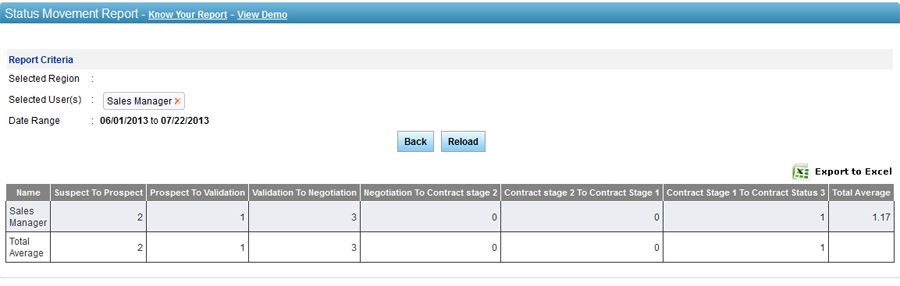
The Status Movement report displays
number of leads moved from one pipeline status to the next one. This report
can be generated for a selected date range and users in the hierarchy.
The report assists the user in calculating average number of leads transferred
from a single pipeline status to the following one for all selected users.
For instance, there are five selected users and two leads moved from Suspect
to Prospect to Prospect to Validation status, so the total average would
be 0.4{number of leads/number of users (2/5 = 0.4)}.
In addition, a user
can view the average number of leads depicted a movement to the next pipeline
status for every selected user. For instance, there are six movements
possible for a lead. A lead owner’s 12 leads depicted a movement from
a particular pipeline status to the other, so the total average would
be 2 {number of leads/number of possible movements (12/6 = 2)}.
To generate Status Movement
report:
1. Select user(s)
from the hierarchy. You can also select a region,
if you want to select user(s)
from specific region.
2. Select from
date.
3. Select to
date.
4. Click on
Submit.
5. Click on
icon to view the report in an MS Excel sheet.
 icon to view the report in an MS Excel sheet.